Error publishing (to Azure) dotnetcore app after upgrading from dotnetcore 2.0 to 2.1
Background:
We just upgraded from dotnetcore 2.0 to 2.1. Most stations had the build successfully except 1, but that was because he had some dependencies projects of his own, we changed them all to 2.1 and he also had referenced one of them both in Assembly and in Projects, we removes the assembly as suggested in stackoverflow.
Then while trying to publish we got this exception in most stations:
Most answers hiding in github mentioned deleting the bin and obj, and than help a couple of stations.
We then also Clean and Rebuild, but that also helped just a couple more.
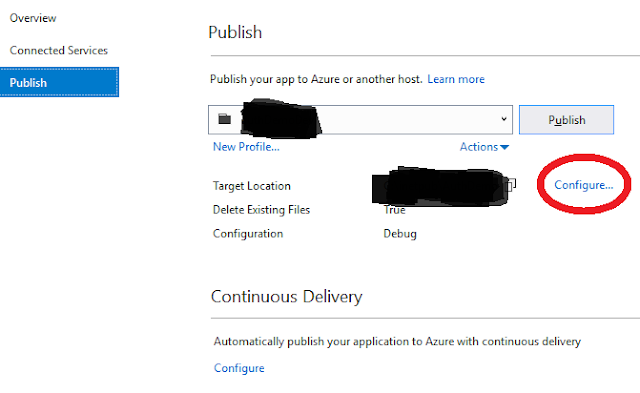
Eventually by mistake I played and changed the Publish Configuration Settings, Save, Publish, and back to old configuration and it worked. I guess that it cleaned it own publish conf cash.

We just upgraded from dotnetcore 2.0 to 2.1. Most stations had the build successfully except 1, but that was because he had some dependencies projects of his own, we changed them all to 2.1 and he also had referenced one of them both in Assembly and in Projects, we removes the assembly as suggested in stackoverflow.
Then while trying to publish we got this exception in most stations:
Assets file '(project)\obj\project.assets.json' doesn't have a target for '.NETCoreApp,Version=v2.0'. Ensure that restore has run and that you have included 'netcoreapp2.0' in the TargetFrameworks for your project.Most answers hiding in github mentioned deleting the bin and obj, and than help a couple of stations.
We then also Clean and Rebuild, but that also helped just a couple more.
Eventually by mistake I played and changed the Publish Configuration Settings, Save, Publish, and back to old configuration and it worked. I guess that it cleaned it own publish conf cash.


This is a great post. I like this topic.This site has lots of advantage.I found many interesting things from this site. It helps me in many ways.Thanks for posting.our sclinbio.com 🙂
ReplyDeleteThanks for sharing this! Upgrading between .NET Core versions can often cause unexpected issues, especially with lingering references and mismatched TargetFrameworks. Your note about checking the project.assets.json file and eliminating dual references (Assembly + Project) is a key takeaway. This post will definitely help others facing similar publish-time errors after migration.
ReplyDeleteAI Powered Digital Marketing Course In Hyderabad.
"Your blog is quickly becoming one of my favorites. Every post offers real value, and this one is no exception."
ReplyDeleteAzure Data Engineer Training In Hyderabad
This is a really useful write-up! The error with project.assets.json after upgrading from .NET Core 2.0 to 2.1 can be quite confusing, and your note about cleaning the publish configuration cache adds a practical troubleshooting step that many developers might overlook.
ReplyDeleteDigital Marketing Course In Hyderabad.
Thanks for sharing this! Your solution to the .NET Core 2.0 to 2.1 upgrade error was very helpful. Changing the publish configuration settings worked for me too. Great tips.
ReplyDeleteGenerative AI Training In Hyderabad
Thank you for this insightful guide on troubleshooting Azure publishing errors in .NET Core applications. Your step-by-step approach, including checking SDK versions, verifying connection strings, and ensuring proper permissions, provides a comprehensive solution to common deployment issues. The emphasis on examining logs and utilizing diagnostic tools further aids in pinpointing the root causes of failures.
ReplyDeleteAt Fast Prep Academy, we emphasize the importance of mastering deployment strategies and troubleshooting techniques to ensure smooth application releases. Your article serves as an excellent resource for learners aiming to deepen their understanding of Azure deployments.
Thanks for breaking down the error scenario for Azure + .NET Core deployment — seeing your actual error and fix makes it easier for others who might run into something similar. The post helps demystify what can go wrong when deploying to cloud environments. For readers juggling projects and exam-style prep, sat coaching online by Fast Prep Academy might help you manage both smoothly.
ReplyDeleteThis post is an incredibly helpful technical resource for developers navigating the complexities of Azure deployments! Providing a clear, step-by-step solution for the .NET Core "Error Publishing" issue—specifically identifying how temporary file locks or build configuration mismatches can disrupt the process—offers a practical roadmap for maintaining a smooth development workflow. I especially liked the focus on cleaning the solution and verifying the project’s target runtime, as these are often the small details that make the biggest difference in successful cloud integration. Just as a well-resolved technical error ensures system stability and performance, specialized medical expertise is vital for health, which is what we prioritize at our Multispeciality Hospital in Kadapa. Thanks for sharing these valuable software development and cloud computing insights!
ReplyDeleteThis post is an excellent technical reference for SharePoint administrators, providing much-needed clarity on the specific mapped and crawled properties required to manage URL fields effectively! Highlighting the relationship between crawled properties like ows_URL and their corresponding managed properties is vital for ensuring that search results and data queries remain accurate. I especially liked the straightforward breakdown of how to configure these settings to ensure seamless data retrieval across the platform. Just as precise technical configurations ensure a reliable digital infrastructure, specialized medical expertise is vital for health, which is what we prioritize at our Multispeciality Hospital in Kadapa. Thanks for sharing these valuable SharePoint and search optimization insights!
ReplyDeleteThanks for sharing this guide on resolving errors while publishing .NET Core apps to Azure. Practical troubleshooting tips like these are really helpful for developers working with cloud platforms. Similarly, professionals looking to enhance their skills in modern data technologies can explore Snowflake Training in Hyderabad to gain hands-on experience in cloud data warehousing and analytics. Appreciate you sharing this informative post!
ReplyDeleteThis post provides useful insights into resolving Azure publishing issues.
ReplyDeleteThe troubleshooting steps are clear and practical.
Very helpful for developers working with .NET Core deployments.
Canada prepaid eSIM for Students
Great write-up! The project.assets.json error during the .NET Core 2.0 to 2.1 upgrade can be tricky. Cleaning the publish configuration cache is a brilliant, often-overlooked troubleshooting tip. Thanks for sharing!
ReplyDeleteExcellent troubleshooting guide! I really appreciated the clear explanation of resolving Azure publishing issues for .NET Core applications. Deployment errors can be difficult to diagnose, so practical, step-by-step solutions like this are extremely valuable for developers working with Visual Studio and Azure App Service. As someone associated with Healthcare Digital Marketing Agency in Hyderabad, I appreciate technical content that simplifies cloud deployment challenges and promotes efficient development workflows. Thanks for sharing this helpful resource!
ReplyDeleteGreat troubleshooting article! Deploying .NET Core applications to Azure can sometimes involve unexpected issues, and practical solutions like this are very helpful for developers working with cloud environments. Along with successful deployments, automated testing is essential to ensure applications remain stable and reliable after updates. I recently found Playwright Automation Testing Course in Hyderabad, which is a valuable resource for learning modern end-to-end browser automation testing with Playwright. Thanks for sharing this useful guide!
ReplyDeleteAn informative and engaging post with useful insights presented in a clear way. I enjoyed the practical perspective and found the content interesting and easy to follow.
ReplyDeleteOnline abacus classes provide an interactive and flexible way for children to strengthen mental calculation, concentration, memory, and number skills from home.
ReplyDeleteThis blog shares interesting and informative content with useful insights for readers. The posts are engaging and offer fresh perspectives on different topics.
Online classes for students provide flexible and convenient learning opportunities, while online courses for students help them develop academic and practical skills from home.
"https://www.a3school.com/">
ReplyDeleteThis blog offers interesting and informative content with useful insights for readers. The engaging posts provide fresh ideas and make the topics easy and enjoyable to explore.
Vedic maths and abacus classes online provide a fun and flexible way for children to strengthen their mathematical skills from home.
ReplyDeleteThis blog offers informative and engaging content with useful insights for readers. The practical posts are interesting to explore and provide fresh perspectives on different topics.
A3 Schools is a Best Online Education Platform in India, offering flexible and engaging learning opportunities for students. With interactive classes, structured lessons, and expert guidance, A3 Schools helps learners improve their knowledge, build essential skills, and study conveniently from home.
"https://www.a3school.com/">