Posts

Showing posts with the label SharePoint 2019

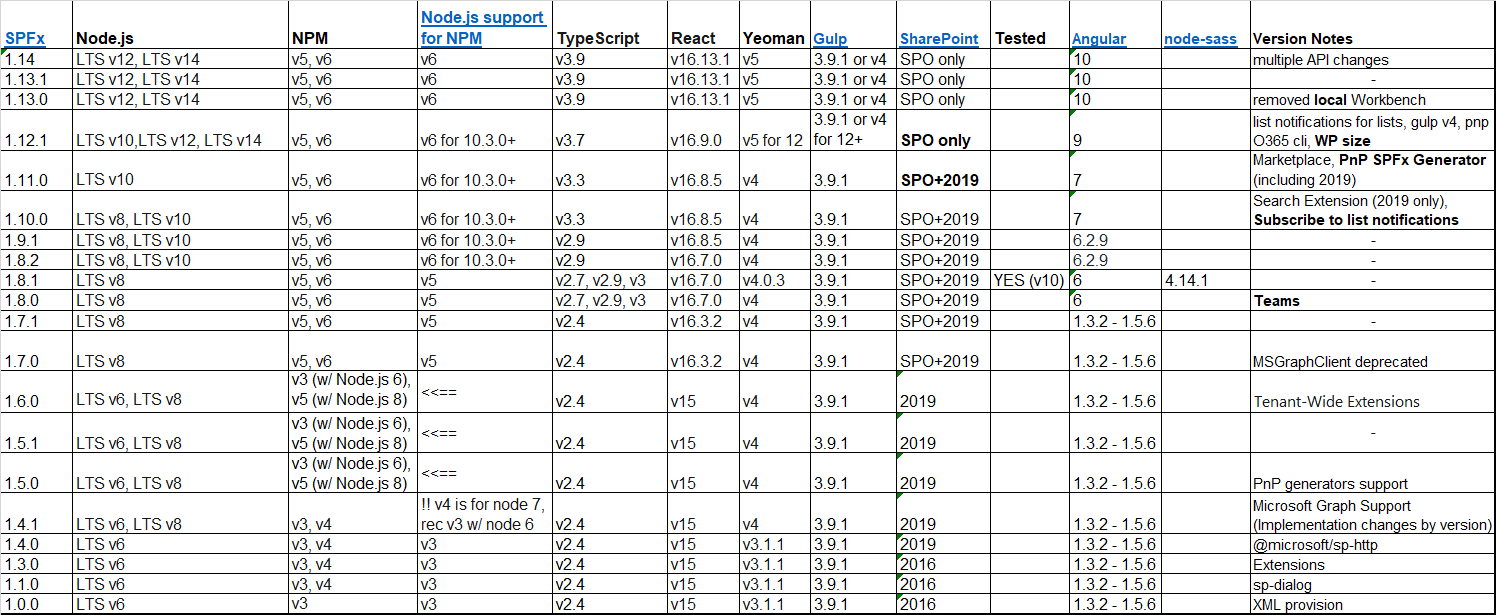
SPFx REAL compatibily materix
Image
Links for sources at the bottom, including Version Notes General Recommendations: 1. Use nvm  (nvm install <nodeVersion>, nvm use <nodeVersion>) ( official site ) 2. The rest do not install with -g 3. Sometimes the best solution is to uninstall node and clean npm from AppData 4. Testing CMD's at the bottom end [click the table to enlarge] According to this stackoverflow answers  they all prefer, at least up to spfx 1.11.0, and with node 10.x, to use gulp 3.9.1 and yo 3.1.0 SOURCES for versioning items SPFx - https://docs.microsoft.com/en-us/sharepoint/dev/spfx/compatibility Node.js support for NPM - https://nodejs.org/en/download/releases/ Gulp, Yeoman, and OnPrem - https://docs.microsoft.com/en-us/sharepoint/dev/spfx/sharepoint-2019-support#nodejs-gulp--yeoman-versions Angular according - https://gist.github.com/LayZeeDK/c822cc812f75bb07b7c55d07ba2719b3 node-sass version lock - https://bresleveloper.blogspot.com/2022/03/spfx-make-applicat...

SharePoint Online/2019 javascript/spfx click/popstate not working

Image
Are you working with SharePoint 2019? Maybe making some SPFx Extensions?  popstate not working?  click not working?  MutationObserver not working?  well, take a look at this As you can see, Microsoft are intercepting every click in the page, while stopping any bubbling. Therefor, any window/document/body onclick event will not work, in case you are trying to globally catch it. Same for popstate or MutationObserver. *Note - on SPO it seems that popstate event works. Solution - make an interval to keep watching href change: let   xPrevLocation  =  location . href let   xOnLocationChangeFunctions  = [] setInterval (() => {      if  ( location . href  !=  xPrevLocation ){          console . log ( "interval location change" ,  xPrevLocation ,  location . href )          xPrevLocation  =  loca...

new SharePoint 2019 machine - cant login into SQL Server

 We have created a newly win2k16 server with sharepoint 2019, and it worked great... Until I tried to enable apps (SPFx), and I needed to create a Subscription Service, and therefor use the SQLSERVER. Whatever I tried I got these error depending on the test, with PowerShell commands (PS), SQL logs, or Sql Server Management Studio (SSMS). Error: 18456, Severity: 14, State: 5. Login failed for user '<DOMAIN>\<USER>'. Reason: Could not find a login matching the name provided. [CLIENT: <local machine>] Error: 18461, Severity: 14, State: 1. Login failed for user '<DOMAIN>\<USER>'. Reason: Server is in single user mode. Only one administrator can connect at this time. [CLIENT: <local machine>] Error: 18456, Severity: 14, State: 58. Login failed for user '<DOMAIN>\<USER>'. Reason: An attempt to login using SQL authentication failed. Server is configured for Windows authentication only. [CLIENT: <local machine>] In t...

Setting new SP2019 dev machine for SPFx

I've made this collection for any other time me or you will get a new SP machine for local dev. Create your Web-App and change the hosts file with new value 127.0.0.1 my-webapp Make browser stop asking for credentials endlessly https://sharepoint.stackexchange.com/questions/11792/external-access-continually-prompted-for-credentials#answer-11846 Sometimes you want to enable multi rdp (not multi user, just multi sessions for same user) https://social.technet.microsoft.com/Forums/en-US/c52b6da7-cdf2-4e1f-95d1-6471c6f2f6b0/easiest-way-to-enable-more-than-2-concurrent-rdp-sessions-on-windows-server-2016?forum=winserverTS#1701fa1f-c7fb-4093-a525-8b188e17c440 OR https://help.matrix42.com/020_ESM/MyWorkspace/10MyWorkspace_Guide/HowTo%3A_Enable_multiple_sessions_for_Remote_Desktop_Services#:~:text=Enable%20Multiple%20RDP%20Sessions,-Log%20into%20the&text=Go%20to%20Computer%20Configuration%20%3E%20Administrative,Desktop%20Services%20session%20to%20Disabled. And in that case, enable open ...