Posts

Working with Angular 4 and .Net the right way - WebApi
Image
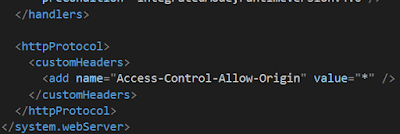
As already stated, Angular is Framework for Singe Page Applications. so its NOT for Websites that wants a good enhancement for their pages. but.... we love Angular so we do want to learn how to do that, but lets start at the beginings 1st lets just create a simple SPA app with WebApi(v2), and see how the thing works. as stated, this tutorial is not to learn how to code, so i'm using the Basic MSDocs example for webApi  as is, just copy paste and make sure its working, and DO try to understand. in the end its just a RestfulAPI. *MAKE SURE you allow CORS for the webApi since we're doing all this at localhost, so add to the web.config (msdn) so we now have these 2 rest urls (you might have a different localhost port like localhost:493820 http://localhost:57267/api/products http://localhost:57267/api/products/1 => [id] great, now we will create an SPA app with 2 tabs, 1 for all and 1 for search. if you never coded in Angular 4, see this coursetro nice tutorial...

Angular 4 - Understanding Angular 4 Basics and Files

Image
so lets start fast by learning to create an Angular 4 project, from the eyes of a .Net developer. 1st pre-requisite is Node JS, download from here. Windows CLI press Windows+R, it will open the "RUN" command line and write "cmd" and press Enter. the windows CLI, "Command Line Interface" will open. go to a folder where you want to put all the project's file, for example for me under documents, the commands will be: [note that pressing " tab " will give best result like " cd d " will complete to " cd documents "] " cd documents " - the CLI starts at your user folder, so this it to go into a child folder " md  "Angular 4" " - you can make folders via CLI " cd "Angular 4" " -  go into that folder Angular CLI so now you will download and create an entire angular 4 project, with Node, and build it and test it in your browser, what used to ...

Angular 4 with .NET (webForms/MVC) Tutorial - Table Of Content

After quite some time, the time for me to start playing with Angular4 has come, and as a .NET developer, used to integrate AngularJS (angular1) with my WebForms / MVC / SharePoint solutions, suddenly there is a CLI, new unknown files, and questions jumps: - Where is the AngularJS file? - Where is MY code? - How do i integrate Angular4 with my .Net solution, MVC or WebForm? - Why do i need all this CLI and NodeJS? well, i would like to answer all of that, after answering that to my self, and share that with you. so i'll just build some posts 1. Angular 4 - History, Why(s), Angular 4 Basic Design. 2. Angular 4 - Understanding Angular 4 Basics and Files. 3. Working with Angular 4 and .Net the right way - WebApi 4. Taking Angular 4 as Stand Alone with Asp.Net Web Forms and MCV Hope you Enjoy!

Angular 4 - History, Why(s), Angular 4 Basic Design

Brief History Stone Age once upon a time a nice company developed a browser named NetScape . all you youngsters that doesn't know what that is, go read that Wiki. anyway they changed the web by inventing JavaScript. with time all new browsers adopted the new scripting language and each implemented it a bit different. you needed to be a real expert to do something better than an alert() or confirm(). the best you had was simple forms. i think we can date this up to the early 90's. jQuery Age then came some standards about JavaScript and CSS, and Java and Microsoft and more developed Web Platforms, which could do cool things in the server, but the client side was the land of jQuery . jQuery was (and still is) an outstanding project for Cross Browser Development upon the Client Side, making is simple to do the same thing with all browsers, including DOM manipulations, Creation, CSS, and even Animations. being a web dev meant being a jQuery man and the term Plugin was ...

Setting up (Kali) Linux on Windows 10 Pro Hyper-v

well, since that forces me to travel along blogs and stuff... lets write everything down. this can be basically the same for any Debian, and i guess even Ubuntu. if i'll write a detailed post it will take forever for something that someone that creates a VM should know, so lets write what is needed. 1. Enabling Hyper-V from  MS DOCS about enabling hyper-v  open Windows Powershell with "Run as Administrator" and copy paste this command  Enable-WindowsOptionalFeature -Online -FeatureName : Microsoft-Hyper -V -All 2. Internet you have 2 ways to go. External, or Internal/Private. External means you create a virtual switch that just connects to your computer's internet and is open to the world. don't forget to get an Anti Virus. Internal/Private means a virtual switch that is not connected to your computer's internet. if you do anything in prod or company or secure, choose this, and go to your default Ethernet connection and share (Pr...

Hyper-V Kali Linux Generation 2

since latest Kali Linux (2017 series) is based on debian 8 or 9, there is support for Generation 2 in the Hyper-V, with UEFI boot, all you need to do is to disable the Secure Boot 1. open Hyper-V Maneger 2. right click on the VM 3. Settings 4. Secuity 5. uncheck "Enable Secure Boot" 6. OK 7. run your VM. all in MS DOCS . there is a PS there also.

Windows, Unix, Linux, and all between

Image
Windows vs Linux? Windows vs Unix? Linux vs Unix? wait isn't that the same thing?? lets break it Up-Down. HISTORY briefing from this answer at stackexchange : in the beginning, somewhere before the 50's, computers could do 1 thing, just like a car that can only drive. you have a wheel, but you cant tell it to pick up something. computers where designed to do 1 specific task and that's it. then in the 50's OS (Operating System) started to apper, but you needed to tell them exactly what to do everytime you wanted to do something. take a look at the list with timeline . there where games already. ye games, like chess and Space Travel. and some guys at AT&T Bell Labs decided to build a better simpler OS to run them. and thus Unix was born. some big boys bought some rights, its was mainly for heavy Enterprise, gov, academy. at a point they made standards for something to be called UNIX, and that lives till today, with 3 variations, POSIX, Single UNIX Spec...

Python vs C#, a REAL answer

Python vs C#, Dynamic vs Static, Imperative vs. Declarative, Compiled vs. Interpreted. and each philosophy. which also puts the design of the language, and open source or not, cross-platform. ohh and lets not forget Strong vs Weak. these are the real comparisons you need to thing about when thinking c# vs python. so lately i'm getting more and more interested in python, for many reasons, it being open-source/linux oriented, its power and ability to be a script and therefor its loved by hackers (i mean pin testers lol), dynamic, ect. ect. problem is that googling something like "C# vs Python" or "why python is better that C#", most answers, including stack, will result in "its more fun", "its dynamic", "less code", "free", "Microsoft is the evil spreading and we must fight it". well, as all that may be true, its not the reason why python is better, but why would I as a programmer would like to start usin...

Sharepoint Search Refine by date

&refinementfilters='MyDateField:range(2014-01-01T00:00:00.0000000Z,2014-12-31T23:59:59.0000000Z,from="ge",to="le")'

Add Promoted Links Web Part as part of the Page Layout SharePoint 2013

< WebPartPages:WebPartZone ID = " WebPartZone " runat = " server " FrameType = " None " >   < WebPartPages:XsltListViewWebPart      ID = " XsltListViewArticlePromotedList "       runat = " server "       ListUrl = " Lists/myList "       IsIncluded = " True "       NoDefaultStyle = " TRUE "       Title = " Images used in switcher "       PageType = " PAGE_NORMALVIEW "       Default = " False "       ViewContentTypeId = " 0x " >     < JSLink > ~site/SiteAssets/PromotedLinks.js </ JSLink >   </ WebPartPages:XsltListViewWebPart > </ WebPartPages:WebPartZone >

jQuery modal dialog inside SharePoint

opening a JQ modal in sharepoint comes with some troubles. 1st since JQ creates the modal OUTSIDE the body, initialy in order to let the modal hover over everything, it does it with some nice calculations. but with SP CSS's and HTML structure that doesn't work well, and sometimes you just don't see the modal, and sometimes you see it wierd. in some cases the JQModal appendTo Property can do the job, but sometimes the best way is to give up jQuery's calculations and just fix the modal's position' and it can be done like that, using destroy since some calculations must be done again while position is not fixed: $( function HP_ready() {     $( ".popup" ).on( "click" , function HPs_popupClick() {         $( ".salaryPopup" , this ).dialog({             bgiframe: true ,             width: 965,    ...

JAVASCRIPT בסיס בעיברית

Image
אנא הסתכלו על השגיאה הזו פה למטה, ואני מאוד מבקש מכל מי שלא יכול לאמר לי בדיוק מה השגיאה רק מהסתכלות על התמונה הזו שיקרא בעיון את המייל הזה והדוגמא שלו. אז אם אתה אחד מאותם חברים יקרים שרוצה ללמוד, אנא פתח במקביל את ה JSBIN הזה שהכנתי במיוחד, ובצד ימין אפשר ללחוץ על הכפתורים clear ואח"כ run כדי להריץ מחדש, וכן כולם מוזמנים לערוך, זה לא יצור גרסה חדשה לכולם אלא מקומית לכל אחד http://jsbin.com/fusuyanoje/2/edit?js,console רקע בסיסי – JS זה שפה שבין היתר מבוססת SCOPE , כלומר כל אובייקט ופונקציה זה SCOPE משל עצמו, שמהווה CHILD ל SCOPE  שמעליו, כאשר הגלובלי, ה ROOT SCOPE , הוא ה WINDOW . חלק מהמנגון הזה אומר ש child scope כאשר הוא מחפש איזה פרמטר/פונקציה אם הוא לא מוצא את זה אצלו הוא יחפש אותו אצל אבא שלו, סבא שלו, סבא רבא וכו'. אז אם נלך לדוגמא שלנו אנו רואים פרמטר בשם globalVar שמוגדר ב ROOT , מה שנקרא גלובלי, ולאורך כל הדרך, בכל מקום בעולם שנחפש אותו אנו תמיד נמצא אותו. לאחר מכן יש לנו פונקציה (וכל פונקיצה היא אובייקט וכל אובייקט הוא פונ...