Posts

Share Folder to Multiple External Users one by onne - Power Automate (item created)

Image
 Scenario: there is a new SP sub-folder every day with some files. this needs to be shared to about 40 different emails daily. BUT with 2 exclusions: 1. sometimes we want these 35 emails, sometimes some other 38 emails. so every day we exclude a few emails, every day different ones. 2. we do not want the "clients" to know about one another, so no bulk sharing or just external link, only share 1 by 1. SOLUTION: 1. SPList for emails ("clients") 2. SP Library containing "main" folder, inside we create daily SP sub-folder with a name (usualy just the date like "25.8.23") 3. SPList for trigger the flow (power automate) on item created, getting from+archive for daily broadcast 4. flow for filtering out excluded emails, and sending 1 by 1 a share email. lets go 1. SPList for emails ("clients") really nothing other than new list, Title for "client name" and another text field for email 2. SP Library containing "main" folder,...
Power Automate Copy SharePoint Page Content to another page in another site

Image
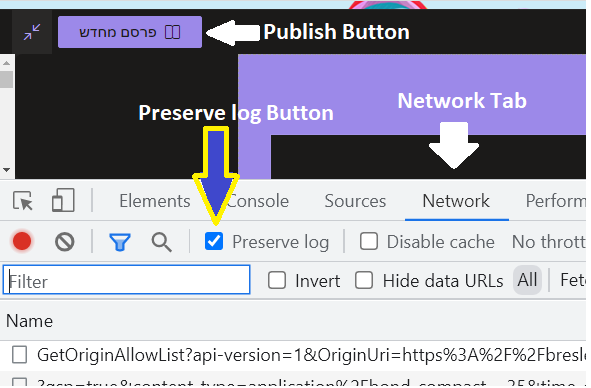
This step is part for the large post Duplicate Sharepoint Online Subsite with all Site Contents and Page[s] - Power Automate But can be used individually. The process is simple, in modern pages they did it so when you save/publish your page they send an ajax request with all the content, so you can just copy all that content and make your own HTTP with that content to update the desired page. After this  you can browse this additional content 1 - copy page and add it to navigation 2 - edit the content that you copy This is a 3 part tutorial 1 - get the data for page content 2 - prepare some data on item created (trigger) 3  - checkout / save  / publish page Part 1 - get the data for page content 1. Open browser and go to your template page (page you want to copy) 2. Edit page  3. Open develpopers tools (F12) and go to Network tab 4. Check the "Preserve log button" 5. Save/Publish the page 6. In the filter write "save" 7. Click View Source to change the date from par...

Power Automate Create sites scripts, designs, and archive for later use

Image
 This step is part of the longer post  Duplicate Sharepoint Online Subsite with all Site Contents and Page[s] - Power Automate And therefor was moved to a seperated post. 3. Create sites scripts, designs, and archive This is a 1-time process (for each design), so it should live as a manually triggered flow. Whenever you make a change, you need to run this again (and change what is relevant, if needed). REMEMBER - that will only affect newly created subsites, not old ones! I will show 1 Flow for 1 template, and you should create multiple, 1 for each template This is the full flow, and I will explain each piece Steps 1-3:  1 - Trigger, nothing to it, 2 - Initialize Variable type of Array, to store the array of our lists and libraries to be copied 3 - Get all lists, retrieve all Custom Lists and Document Libraries Display Names, from the Template Site (in my example - "ITX2-root") NOTICE - this is problematic in 2 ways: First it retrieves only the Display Names, meaning that...