Posts

Power Automate Copy SharePoint Page Content to another page in another site
Image
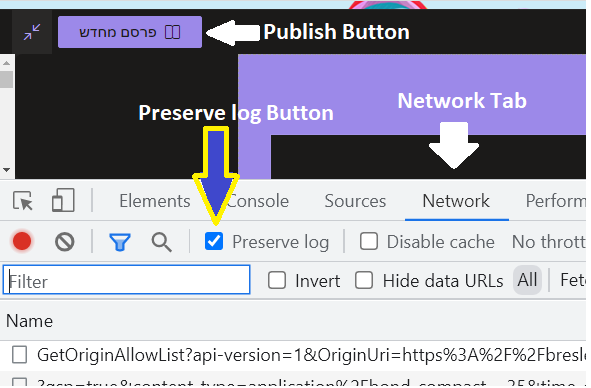
This step is part for the large post Duplicate Sharepoint Online Subsite with all Site Contents and Page[s] - Power Automate But can be used individually. The process is simple, in modern pages they did it so when you save/publish your page they send an ajax request with all the content, so you can just copy all that content and make your own HTTP with that content to update the desired page. After this  you can browse this additional content 1 - copy page and add it to navigation 2 - edit the content that you copy This is a 3 part tutorial 1 - get the data for page content 2 - prepare some data on item created (trigger) 3  - checkout / save  / publish page Part 1 - get the data for page content 1. Open browser and go to your template page (page you want to copy) 2. Edit page  3. Open develpopers tools (F12) and go to Network tab 4. Check the "Preserve log button" 5. Save/Publish the page 6. In the filter write "save" 7. Click View Source to change the date from par...

Power Automate Create sites scripts, designs, and archive for later use

Image
 This step is part of the longer post  Duplicate Sharepoint Online Subsite with all Site Contents and Page[s] - Power Automate And therefor was moved to a seperated post. 3. Create sites scripts, designs, and archive This is a 1-time process (for each design), so it should live as a manually triggered flow. Whenever you make a change, you need to run this again (and change what is relevant, if needed). REMEMBER - that will only affect newly created subsites, not old ones! I will show 1 Flow for 1 template, and you should create multiple, 1 for each template This is the full flow, and I will explain each piece Steps 1-3:  1 - Trigger, nothing to it, 2 - Initialize Variable type of Array, to store the array of our lists and libraries to be copied 3 - Get all lists, retrieve all Custom Lists and Document Libraries Display Names, from the Template Site (in my example - "ITX2-root") NOTICE - this is problematic in 2 ways: First it retrieves only the Display Names, meaning that...

Duplicate Sharepoint Online Subsite with all Site Contents and Page[s] - Power Automate

Image
 Too many was written, too scattered. So i'll try to make something complete. Our client wans a simple flow, when SP Items is created, duplicate 2 Template Sites, BOTH ARE SUBSITES, with the Document Libraries (can be also lists), and squeeze in (inject) some content (to the pages). Well 1st let me add that if the request would have included some design, or being a Root Site (like when you click "SharePoint" and "Create Site") than you would definitely use the "Create Site Design" ect. to some Library and apply it. But for me its different, so lets describe the actual steps: Its a bit of a process but I believe that you can take it in less than 1 hour with this full tutorial Table of Content 1. Build 2 ROOT sites and design them, theme, lists, libraries, columns (no content! - for content only PNP xml Engine) 2. Create helper lists in helper site (just another side site for some management) 3. Create sites scripts, designs, and archive for later use (r...

BadGateway (502) CreateSiteScript Power Automate

 using endpoint  /_api/Microsoft.SharePoint.Utilities.WebTemplateExtensions.SiteScriptUtility.CreateSiteScript(Title=@title)?@title='DemoSiteScript' we got error  BadGateway solution - user must be SharePoint Admin

SPFx REAL compatibily materix

Image
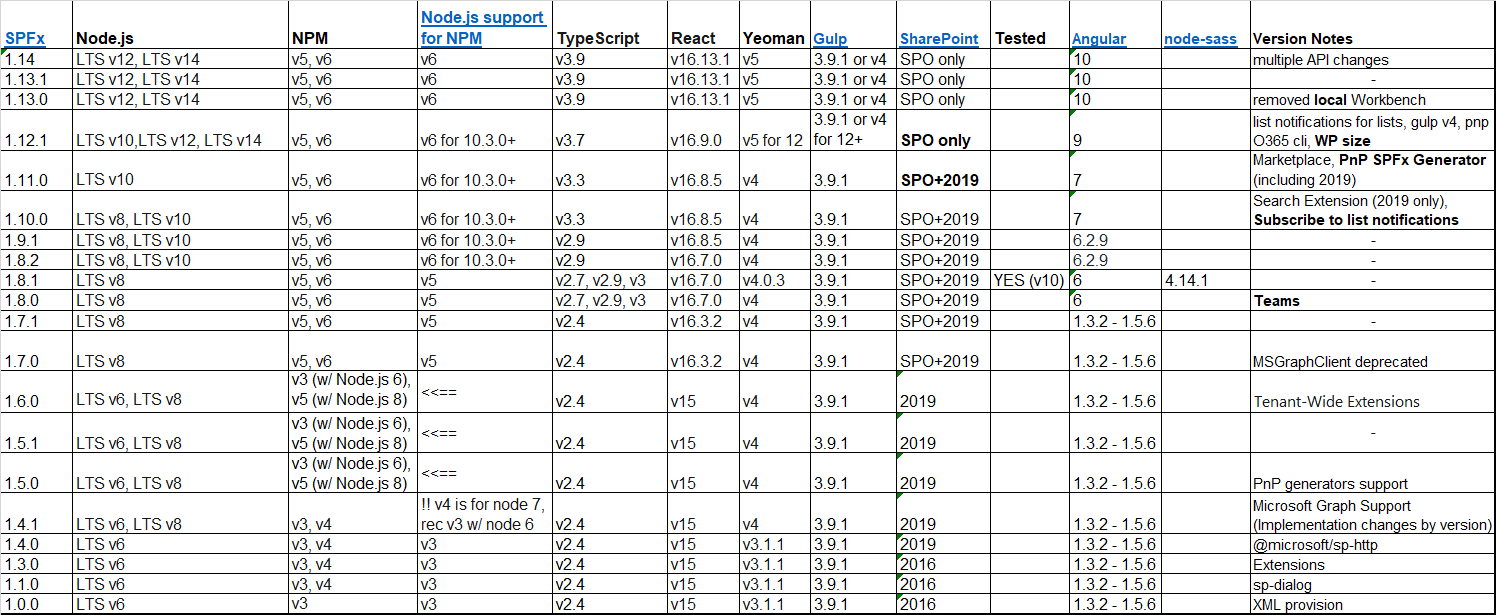
Links for sources at the bottom, including Version Notes General Recommendations: 1. Use nvm  (nvm install <nodeVersion>, nvm use <nodeVersion>) ( official site ) 2. The rest do not install with -g 3. Sometimes the best solution is to uninstall node and clean npm from AppData 4. Testing CMD's at the bottom end [click the table to enlarge] According to this stackoverflow answers  they all prefer, at least up to spfx 1.11.0, and with node 10.x, to use gulp 3.9.1 and yo 3.1.0 SOURCES for versioning items SPFx - https://docs.microsoft.com/en-us/sharepoint/dev/spfx/compatibility Node.js support for NPM - https://nodejs.org/en/download/releases/ Gulp, Yeoman, and OnPrem - https://docs.microsoft.com/en-us/sharepoint/dev/spfx/sharepoint-2019-support#nodejs-gulp--yeoman-versions Angular according - https://gist.github.com/LayZeeDK/c822cc812f75bb07b7c55d07ba2719b3 node-sass version lock - https://bresleveloper.blogspot.com/2022/03/spfx-make-applicat...

Flow How to test if MultiChoice is empty array?

Usually this should be empty, null or empty string. But after my migration  1. find the value, with loops it can be something like "items('Apply_to_each_2')?['Value']" 2. init variable and set it as Expression "string(items('Apply_to_each_2')?['Value'])" 3. test is vs "string('[]')"

SPFX Make Application Customizer for version 1.8.x

github solution made just for you ♥  1. create 2 projects, 1 as "2019 onwards" to select "Application Customizer" and another simple for SPO, I am assuming that the yo version in your machine is 1.8.x npm ls -g --depth=0 @microsoft/generator-sharepoint 2.  change accordingly values in       "/config/config.json"      "/config/package-solution.json" make sure you change words "webparts" to "extensions", also adding "ApplicationCustomizer" everywhere, including "...Strings" in last line of config.json create the "..ApplicationCustomizer.ts" file and all the files in its folder and create the 2 XML files under "sharepoint/assets" copy the GUID from "..ApplicationCustomizer.manifest.json"  to the XML's (and serve.json) 3. create npm-shrinkwrap.json with the following {     "dependencies" : {         "graceful-fs" : {             "version" : "4...

Power Apps Sort Alphabetically

 Collect(AllTags, 'list1'.'Tag Number', 'list2'.'Tag Number', list3.'Tag Number'); ClearCollect(disticntSortTags,     Distinct(         Sort( AllTags, Tag_x0020_Number, Ascending ) , Tag_x0020_Number)) Contact us now for more help developing great Power Apps!

microsoft flow (power automation) test if lookup is empty

 You need to use "empty" expression on the Lookup Value and Condition equals to expression "true" (of false or not equal ect.)

SFPx Node-Saas Error

 If you get this kind of error Node Sass does not yet support your current environment: Windows 64-bit with Unsupported runtime (83) or any other kind of gulp build errors, and if its after you upgraded to Node 14.X, and upgraded your YO generator, then its because all the dependencies changed, and you need to migrage. so here is a simple solution: 1. Create a side clean SPFx project (Webpart or Extension (Extension is only with 2019+)) 2. Save somewhere (just in case) the following files  package.json, tsconfig.json, package-lock.json 3. Copy from your new project to your old project only 2 files   package.json, tsconfig.json * change the name and version of your project in the package.json file 4. Run gulp clean 5. Run npm install 6. Run gulp build ect. Do you need an SPFx Developers? Contact us now!

Sharepoint Online List Item Edit Display Forms link

 /sites/Portal/Lists/List10/DispForm.aspx?ID=4 /sites/Portal/Lists/List10/EditForm.aspx?ID=4

SharePoint Online/2019 javascript/spfx click/popstate not working

Image
Are you working with SharePoint 2019? Maybe making some SPFx Extensions?  popstate not working?  click not working?  MutationObserver not working?  well, take a look at this As you can see, Microsoft are intercepting every click in the page, while stopping any bubbling. Therefor, any window/document/body onclick event will not work, in case you are trying to globally catch it. Same for popstate or MutationObserver. *Note - on SPO it seems that popstate event works. Solution - make an interval to keep watching href change: let   xPrevLocation  =  location . href let   xOnLocationChangeFunctions  = [] setInterval (() => {      if  ( location . href  !=  xPrevLocation ){          console . log ( "interval location change" ,  xPrevLocation ,  location . href )          xPrevLocation  =  loca...

debugManifestsFile Error

  Error loading debug script. Ensure the server is running and the "debugManifestsFile" parameter URL is correct. Error: Script error for " https://localhost:4321/temp/manifests.js " SOLUTION browse to  https://localhost:4321/temp/manifests.js  and allow to proceed to unsafe, and refresh the original page

SPFx with Angular, Full tutorial

 White you can use the pnp-generator , I really wanted to created this kind of solution all by myself, since I also wanted to implement it with SP-2019, with SFPx 1.4.x Part 1: Setup I started with a clean machine, installed LTS node 14.17.0 , and installed latest gulp, yo, sp-generator for yo, and angular-cli command: npm install gulp yo @microsoft/generator-sharepoint --global results: + gulp@4.0.2 + yo@4.2.0 + @microsoft/generator-sharepoint@1.12.1 command: npm install -g @angular/cli results: + @angular/cli@12.0.2 *NOTE - To the time of writing, I had an error generating browser application bundles so I downgraded to angular 10.x, and re-create the project npm uninstall -g @angular/cli npm cache clean --force npm install -g @angular/cli@10.2.0 And so our journey begins! Create new Ng project ng new ng-for-spfx-ex Create new SPFx WebPart Project - just  yo Part 2: Test NG with SPFx Within the  angular.json   file lets change the output path, I've made 1 folde...

Windows run as a different user from CMD

 On my journey to fix my dev env I learned some cool trick on how to run stuff in windows as another user, from CMD * For running the .exe files you need to navigate to their folders or run full path The basic operation to run as user is runas /netonly /user:<DOMAIN>\<USER> <COMMAND> So, for example domain is MyDom, and user is OthrUsr - Just open CMD runas /netonly /user:MyDom\OthrUsr cmd - Open PowerShell cd "C:\Windows\System32\WindowsPowerShell\v1.0\" runas /netonly /user: MyDom\OthrUsr  PowerShell.exe - Open SharePoint PowerShell cd "C:\Windows\System32\WindowsPowerShell\v1.0\" runas /netonly /user: MyDom\OthrUsr  PowerShell.exe . "C:\Program Files\Common Files\Microsoft Shared\Web Server Extensions\16\CONFIG\POWERSHELL\Registration\SharePoint.ps1" *According to your SP version the "16" might be 15 (for sp13) or 14 (for sp10) - Open SQL Server Management Studio (SSMS)  (path can chage according to version) cd "C:\Progr...

new SharePoint 2019 machine - cant login into SQL Server

 We have created a newly win2k16 server with sharepoint 2019, and it worked great... Until I tried to enable apps (SPFx), and I needed to create a Subscription Service, and therefor use the SQLSERVER. Whatever I tried I got these error depending on the test, with PowerShell commands (PS), SQL logs, or Sql Server Management Studio (SSMS). Error: 18456, Severity: 14, State: 5. Login failed for user '<DOMAIN>\<USER>'. Reason: Could not find a login matching the name provided. [CLIENT: <local machine>] Error: 18461, Severity: 14, State: 1. Login failed for user '<DOMAIN>\<USER>'. Reason: Server is in single user mode. Only one administrator can connect at this time. [CLIENT: <local machine>] Error: 18456, Severity: 14, State: 58. Login failed for user '<DOMAIN>\<USER>'. Reason: An attempt to login using SQL authentication failed. Server is configured for Windows authentication only. [CLIENT: <local machine>] In t...

Setting new SP2019 dev machine for SPFx

I've made this collection for any other time me or you will get a new SP machine for local dev. Create your Web-App and change the hosts file with new value 127.0.0.1 my-webapp Make browser stop asking for credentials endlessly https://sharepoint.stackexchange.com/questions/11792/external-access-continually-prompted-for-credentials#answer-11846 Sometimes you want to enable multi rdp (not multi user, just multi sessions for same user) https://social.technet.microsoft.com/Forums/en-US/c52b6da7-cdf2-4e1f-95d1-6471c6f2f6b0/easiest-way-to-enable-more-than-2-concurrent-rdp-sessions-on-windows-server-2016?forum=winserverTS#1701fa1f-c7fb-4093-a525-8b188e17c440 OR https://help.matrix42.com/020_ESM/MyWorkspace/10MyWorkspace_Guide/HowTo%3A_Enable_multiple_sessions_for_Remote_Desktop_Services#:~:text=Enable%20Multiple%20RDP%20Sessions,-Log%20into%20the&text=Go%20to%20Computer%20Configuration%20%3E%20Administrative,Desktop%20Services%20session%20to%20Disabled. And in that case, enable open ...